---
title: What is the Tukios Arrangement Software?
description: Introducing you to our new Family Arrangement Software! We want to try and help the funeral planning process with families be as easy and transparent as possible.
---
[Skip to content](https://help.tukios.com/help/what-is-the-tukios-arrangement-software#main-content)
English
Show submenu for translations
[Call or Email Here](https://help.tukios.com/help/kb-tickets/new?hsLang=en)
![tukios gradient logo-1.png\]](https://help.tukios.com/hs-fs/hubfs/tukios%20gradient%20logo-1.png?height=40&name=tukios%20gradient%20logo-1.png)
Open main navigation
Close main navigation
- English
Show submenu for translations
- [Call or Email Here](https://help.tukios.com/help/kb-tickets/new)
- Go to tukios.com
Go to tukios.com
Search articles or call us at (801) 682-4391
- There are no suggestions because the search field is empty.
1. [Help Desk](https://help.tukios.com/help?hsLang=en)
2. [Websites](https://help.tukios.com/help/websites?hsLang=en)
3. [Arrangement Software](https://help.tukios.com/help/websites?hsLang=en#arrangement-software)
# What is the Tukios Arrangement Software?
## Introducing you to our new Family Arrangement Software! We want to try and help the funeral planning process with families be as easy and transparent as possible.
FROM THE FUNERAL DIRECTOR SIDE:
1. You can create funeral packages to fit the families needs. To add a package start by naming it and giving it a price. 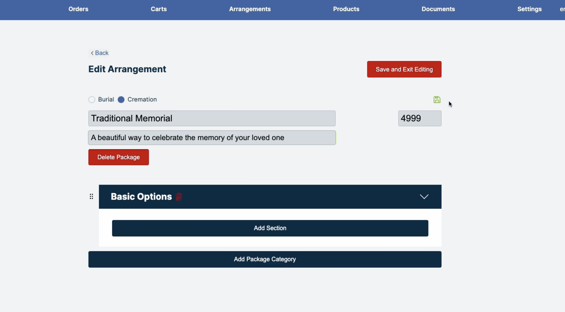
2. Once you have completed that section, you can click the green save icon and add specific sections applicable to the package.
1. Local and global products will be available to choose from.
2. Your arrangements and prices can be edited at any time!
3. You can also add custom products for the families to choose from and organize them by category. 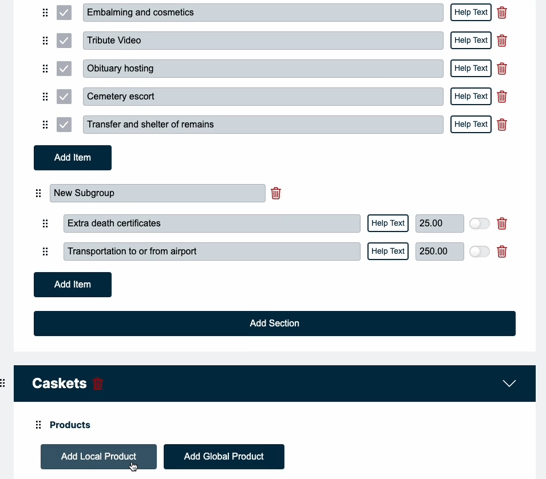
4. Be sure to select a default for all product categories.
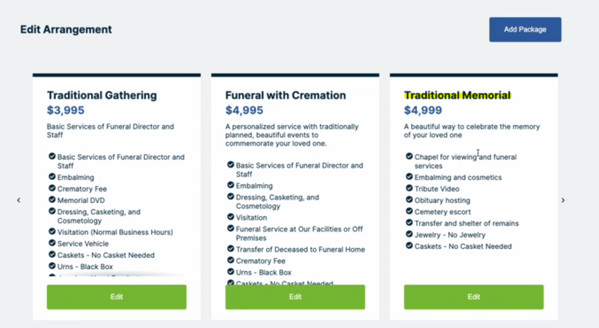
5. After you click save and exit editing, you can view what the newest package will look like.
- You as the funeral home, can go to the section at the top called "carts" and see what the family has been looking at before they have checked out. Click "view details" to learn more about what package they have started. 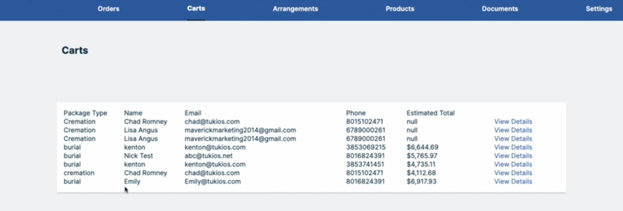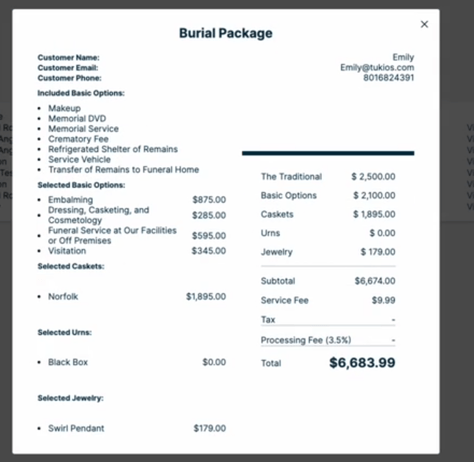
- In the software, you also have the option to upload any documents, and request a signature from families.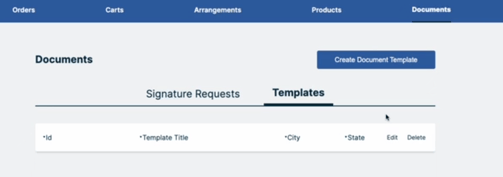
- We have also added a section called "settings" where you can customize some of the things about your specific arrangement software, such as color, GPL URLs, and covering certain fees.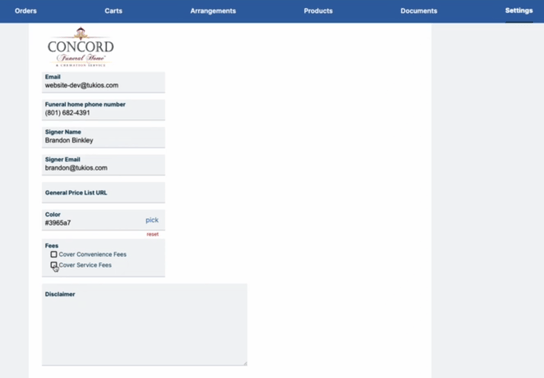
FROM THE FAMILY SIDE:
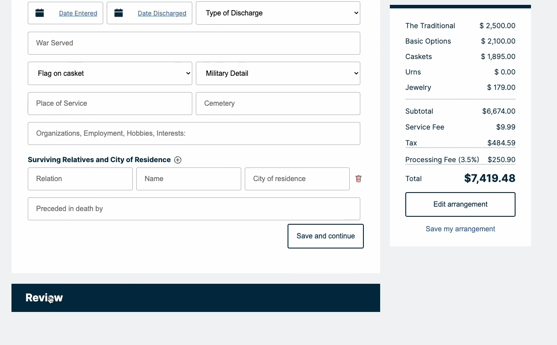
1. When the family goes to start arrangements with your funeral home, they will be prompted to choose a plan and select the options that they want. 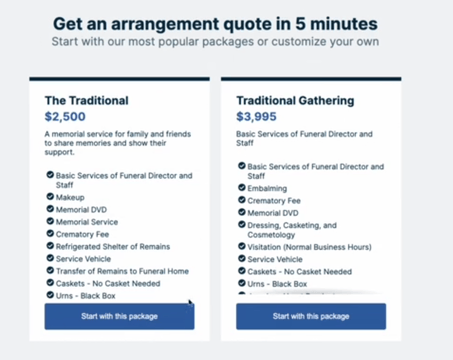
2. From there, they can fill out the information about the deceased! The software will automatically save their choices, so they can come back and look at it later.
- If you have already been set up with the arrangement software, it will be located at sympathyplan.com!
- If you aren't set up and you are interested in getting started, get in contact with your account manager or our support team!
- The cost to use the arrangement software is $99/month OR $999/year
If you have any other questions, please feel free to email or call us.
support@tukios.com | 801.682.4391
- [Websites](https://help.tukios.com/help/websites?hsLang=en#main-content)
- [Arrangement Software](https://help.tukios.com/help/websites?hsLang=en#arrangement-software)
- [Obituaries](https://help.tukios.com/help/websites?hsLang=en#obituaries)
- [Services](https://help.tukios.com/help/websites?hsLang=en#services)
- [Users](https://help.tukios.com/help/websites?hsLang=en#users)
- [Settings](https://help.tukios.com/help/websites?hsLang=en#settings)
- [Integrations](https://help.tukios.com/help/websites?hsLang=en#integrations)
- [Website Editor](https://help.tukios.com/help/websites?hsLang=en#website-editor)
- [Heardstone](https://help.tukios.com/help/websites?hsLang=en#heardstone)
- [Floral](https://help.tukios.com/help/floral?hsLang=en#main-content)
- [General](https://help.tukios.com/help/floral?hsLang=en#general)
- [Products](https://help.tukios.com/help/floral?hsLang=en#products)
- [Payouts](https://help.tukios.com/help/floral?hsLang=en#payouts)
- [Settings](https://help.tukios.com/help/floral?hsLang=en#settings)
- [Videos](https://help.tukios.com/help/videos?hsLang=en#main-content)
- [Family Upload Link](https://help.tukios.com/help/videos?hsLang=en#family-upload-link)
- [Labels and Jackets](https://help.tukios.com/help/videos?hsLang=en#labels-and-jackets)
- [Burn DVD](https://help.tukios.com/help/videos?hsLang=en#burn-dvd)
- [Setup Page](https://help.tukios.com/help/videos?hsLang=en#setup-page)
- [Themes](https://help.tukios.com/help/videos?hsLang=en#themes)
- [Slides Page](https://help.tukios.com/help/videos?hsLang=en#slides-page)
- [Music Page](https://help.tukios.com/help/videos?hsLang=en#music-page)
- [Video Details Page](https://help.tukios.com/help/videos?hsLang=en#video-details-page)
- [Direct Delivery](https://help.tukios.com/help/videos?hsLang=en#direct-delivery)
- [Extra Video Tools](https://help.tukios.com/help/videos?hsLang=en#extra-video-tools)
- [Placing Tukios Videos on Your Website](https://help.tukios.com/help/videos?hsLang=en#placing-tukios-videos-on-your-website)
- [Account Settings](https://help.tukios.com/help/videos?hsLang=en#account-settings)
- [Billing](https://help.tukios.com/help/videos?hsLang=en#billing)
- [Scanning](https://help.tukios.com/help/videos?hsLang=en#scanning)
- [Troubleshooting](https://help.tukios.com/help/videos?hsLang=en#troubleshooting)
- [Keepsake Products](https://help.tukios.com/help/videos?hsLang=en#keepsake-products)
- [Aftercare](https://help.tukios.com/help/aftercare?hsLang=en)
[](http://tukios.com)
tukios.com Help Desk
Copyright © 2026, Tukios Inc