---
title: How do I upload a logo?
description: You can upload a logo into the Tukios system to allow a deeper level of personalization.
---
[Skip to content](https://help.tukios.com/help/how-do-i-upload-a-logo#main-content)
English
Show submenu for translations
[Call or Email Here](https://help.tukios.com/help/kb-tickets/new?hsLang=en)
![tukios gradient logo-1.png\]](https://help.tukios.com/hs-fs/hubfs/tukios%20gradient%20logo-1.png?height=40&name=tukios%20gradient%20logo-1.png)
Open main navigation
Close main navigation
- English
Show submenu for translations
- [Call or Email Here](https://help.tukios.com/help/kb-tickets/new)
- Go to tukios.com
Go to tukios.com
Search articles or call us at (801) 682-4391
- There are no suggestions because the search field is empty.
1. [Help Desk](https://help.tukios.com/help?hsLang=en)
2. [Videos](https://help.tukios.com/help/videos?hsLang=en)
3. [Account Settings](https://help.tukios.com/help/videos?hsLang=en#account-settings)
# How do I upload a logo?
## You can upload a logo into the Tukios system to allow a deeper level of personalization.
You can upload a logo to be placed at the end of your videos and on your labels.
When you enter the site, either through the affiliate or through the Tukios website, in the upper left-hand side is the Menu button.
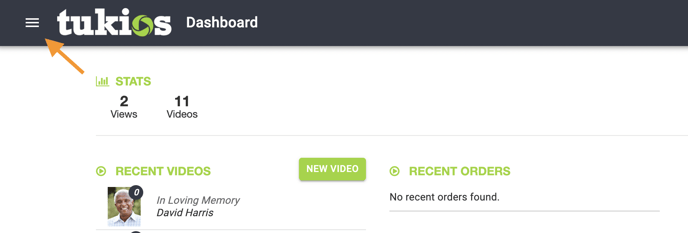
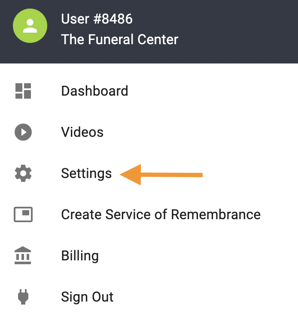
Once clicked, go to your settings.
Once in the Settings, go to the second tab that says "Logo". Click Choose File, find the logo you wish to upload, then click open.
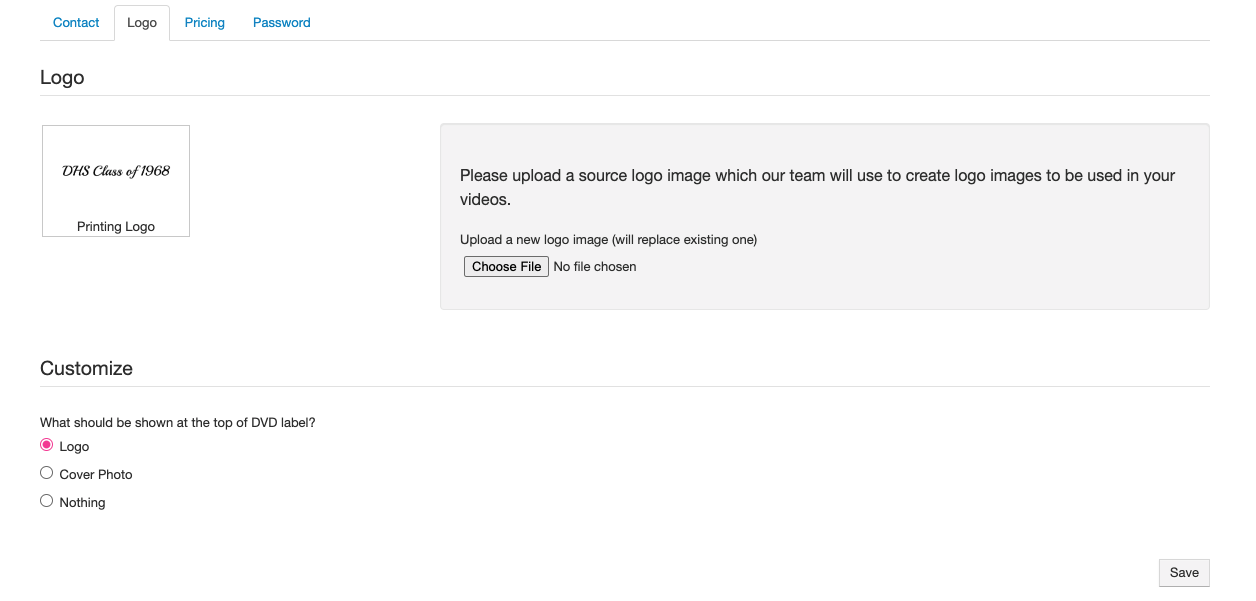
Once it has been uploaded, it will be placed in our logo templates and re-uploaded for your benefit.
We prefer .AI, .EPS, .PSD or High Resolution .JPEGs for the logo creation process.
Here is a look at how the logo displays at the end of your videos:

If you have any other questions, please feel free to email or call us.
support@tukios.com | 801.682.4391
- [Websites](https://help.tukios.com/help/websites?hsLang=en#main-content)
- [Arrangement Software](https://help.tukios.com/help/websites?hsLang=en#arrangement-software)
- [Obituaries](https://help.tukios.com/help/websites?hsLang=en#obituaries)
- [Services](https://help.tukios.com/help/websites?hsLang=en#services)
- [Users](https://help.tukios.com/help/websites?hsLang=en#users)
- [Settings](https://help.tukios.com/help/websites?hsLang=en#settings)
- [Integrations](https://help.tukios.com/help/websites?hsLang=en#integrations)
- [Website Editor](https://help.tukios.com/help/websites?hsLang=en#website-editor)
- [Heardstone](https://help.tukios.com/help/websites?hsLang=en#heardstone)
- [Floral](https://help.tukios.com/help/floral?hsLang=en#main-content)
- [General](https://help.tukios.com/help/floral?hsLang=en#general)
- [Products](https://help.tukios.com/help/floral?hsLang=en#products)
- [Payouts](https://help.tukios.com/help/floral?hsLang=en#payouts)
- [Settings](https://help.tukios.com/help/floral?hsLang=en#settings)
- [Videos](https://help.tukios.com/help/videos?hsLang=en#main-content)
- [Family Upload Link](https://help.tukios.com/help/videos?hsLang=en#family-upload-link)
- [Labels and Jackets](https://help.tukios.com/help/videos?hsLang=en#labels-and-jackets)
- [Burn DVD](https://help.tukios.com/help/videos?hsLang=en#burn-dvd)
- [Setup Page](https://help.tukios.com/help/videos?hsLang=en#setup-page)
- [Themes](https://help.tukios.com/help/videos?hsLang=en#themes)
- [Slides Page](https://help.tukios.com/help/videos?hsLang=en#slides-page)
- [Music Page](https://help.tukios.com/help/videos?hsLang=en#music-page)
- [Video Details Page](https://help.tukios.com/help/videos?hsLang=en#video-details-page)
- [Direct Delivery](https://help.tukios.com/help/videos?hsLang=en#direct-delivery)
- [Extra Video Tools](https://help.tukios.com/help/videos?hsLang=en#extra-video-tools)
- [Placing Tukios Videos on Your Website](https://help.tukios.com/help/videos?hsLang=en#placing-tukios-videos-on-your-website)
- [Account Settings](https://help.tukios.com/help/videos?hsLang=en#account-settings)
- [Billing](https://help.tukios.com/help/videos?hsLang=en#billing)
- [Scanning](https://help.tukios.com/help/videos?hsLang=en#scanning)
- [Troubleshooting](https://help.tukios.com/help/videos?hsLang=en#troubleshooting)
- [Keepsake Products](https://help.tukios.com/help/videos?hsLang=en#keepsake-products)
- [Aftercare](https://help.tukios.com/help/aftercare?hsLang=en)
- [Internal Helpdesk](https://help.tukios.com/help/internal-helpdesk?hsLang=en#main-content)
- [Videos](https://help.tukios.com/help/internal-helpdesk?hsLang=en#videos)
[](http://tukios.com)
tukios.com Help Desk
Copyright © 2026, Tukios Inc