---
title: How Do I Make a Tribute Video?
description: This article is to help Tukios customers understand how to make edit and finalize a tribute video in the Tukios Tribute Video software
---
[Skip to content](https://help.tukios.com/help/how-do-i-make-a-tribute-video#main-content)
English
Show submenu for translations
[Call or Email Here](https://help.tukios.com/help/kb-tickets/new?hsLang=en)
![tukios gradient logo-1.png\]](https://help.tukios.com/hs-fs/hubfs/tukios%20gradient%20logo-1.png?height=40&name=tukios%20gradient%20logo-1.png)
Open main navigation
Close main navigation
- English
Show submenu for translations
- [Call or Email Here](https://help.tukios.com/help/kb-tickets/new)
- Go to tukios.com
Go to tukios.com
Search articles or call us at (801) 682-4391
- There are no suggestions because the search field is empty.
1. [Help Desk](https://help.tukios.com/help?hsLang=en)
2. [Videos](https://help.tukios.com/help/videos?hsLang=en)
# How Do I Make a Tribute Video?
## This is a Comprehensive Tribute Training Video for the Tukios Tribute Video Software. This will walk you through the steps of creating a video from start to finish.
1\. Once you start a video you will see this page:

2\. Change the Introductory Text if needed, add a title (usually the name) and a subtitle (the birth date-death date)

3\. Pick a theme, click the change button to browse themes

4\. Search for themes or select one below
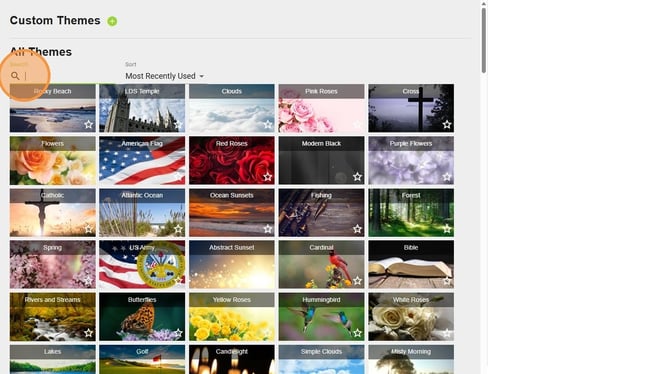
5\. Search or browse for themes

6\. Click "Use Theme"

7\. It will bring you back to the first page automatically, Click "Next"

8\. From here you can enable the Family upload link and sent this to families via text email or other forms of communication. Please see this article for more information
[*What is the Family Photo Upload Link?*](https://help.tukios.com/help/what-is-the-family-photo-upload?hsLang=en)
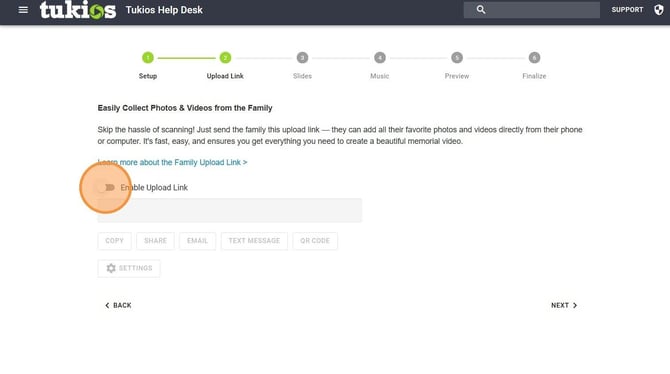
9\. Click "Next"

10\. Anything the family has uploaded will populate in here automatically, you can also add your own from your computer by clicking "Add Photos/Videos"

11\. You can also add text slides by clicking the "Add Text Slide" button. For more information go look at this article
*[How Do I Create a Text Slide?](https://help.tukios.com/help/how-do-i-create-a-text-slide?hsLang=en)*

12: You can edit each individual photo by clicking the pencil icon.
For more information on how to edit go to this article
*[Photo Editing Options](https://help.tukios.com/help/photo-editing-options?hsLang=en)*
You can also sort photos/videos as needed by dragging and dropping the photos to your desired order
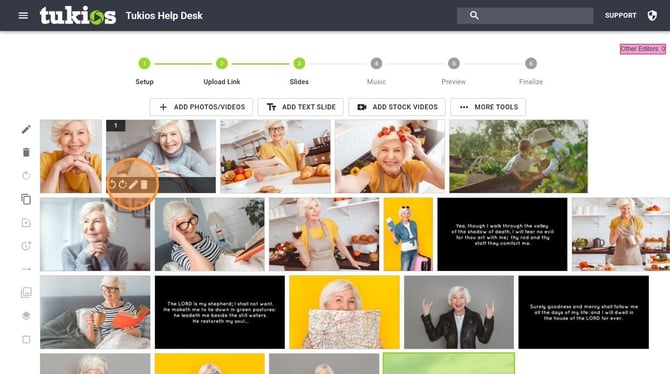
13\. Once you are ready to move on Click "Next"

14\. This is the music section. To start Click "Add Music" to view our stock music as well as upload your own or create one using our AI Music Generator
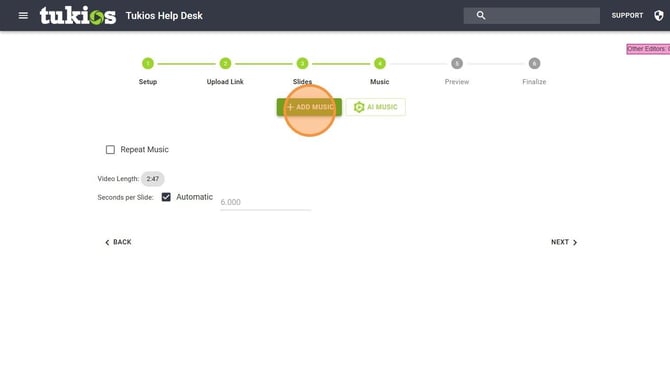
15\. The music will need to match the time of the video. You can click "Repeat Music" to automatically cycle through the music or add more music

16\. Once music is good to go Click "Next"

17\. From this screen you can preview the video. The preview will be lower quality then the finished product

18\. From here you can purchase keepsakes at wholesale cost

19\. Click the "I agree to the Stock Music License Agreement"

20\. Click "Place Order"
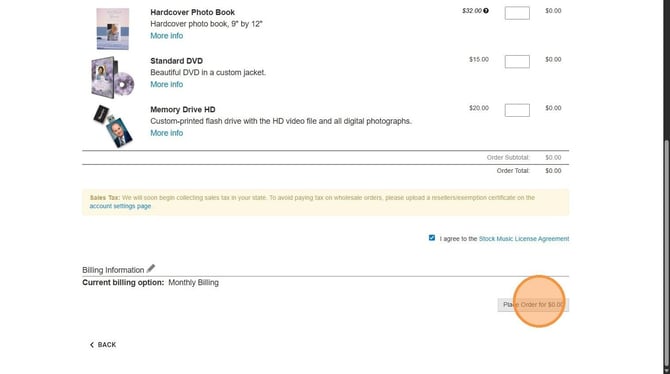
1. Click "Okay"

21\. From here you can share, burn, or manage your video

Additional Info:
- To edit the video Click "Edit"
- Then Click "Edit Video"

- This will take you back to step 1
If you have any other questions, please feel free to email or call us
[support@tukios.com](mailto:support@tukios.com) | [801.682.4391](tel:8016824391)
- [Websites](https://help.tukios.com/help/websites?hsLang=en#main-content)
- [Arrangement Software](https://help.tukios.com/help/websites?hsLang=en#arrangement-software)
- [Obituaries](https://help.tukios.com/help/websites?hsLang=en#obituaries)
- [Services](https://help.tukios.com/help/websites?hsLang=en#services)
- [Users](https://help.tukios.com/help/websites?hsLang=en#users)
- [Settings](https://help.tukios.com/help/websites?hsLang=en#settings)
- [Integrations](https://help.tukios.com/help/websites?hsLang=en#integrations)
- [Website Editor](https://help.tukios.com/help/websites?hsLang=en#website-editor)
- [Heardstone](https://help.tukios.com/help/websites?hsLang=en#heardstone)
- [Floral](https://help.tukios.com/help/floral?hsLang=en#main-content)
- [General](https://help.tukios.com/help/floral?hsLang=en#general)
- [Products](https://help.tukios.com/help/floral?hsLang=en#products)
- [Payouts](https://help.tukios.com/help/floral?hsLang=en#payouts)
- [Settings](https://help.tukios.com/help/floral?hsLang=en#settings)
- [Videos](https://help.tukios.com/help/videos?hsLang=en#main-content)
- [Family Upload Link](https://help.tukios.com/help/videos?hsLang=en#family-upload-link)
- [Labels and Jackets](https://help.tukios.com/help/videos?hsLang=en#labels-and-jackets)
- [Burn DVD](https://help.tukios.com/help/videos?hsLang=en#burn-dvd)
- [Setup Page](https://help.tukios.com/help/videos?hsLang=en#setup-page)
- [Themes](https://help.tukios.com/help/videos?hsLang=en#themes)
- [Slides Page](https://help.tukios.com/help/videos?hsLang=en#slides-page)
- [Music Page](https://help.tukios.com/help/videos?hsLang=en#music-page)
- [Video Details Page](https://help.tukios.com/help/videos?hsLang=en#video-details-page)
- [Direct Delivery](https://help.tukios.com/help/videos?hsLang=en#direct-delivery)
- [Extra Video Tools](https://help.tukios.com/help/videos?hsLang=en#extra-video-tools)
- [Placing Tukios Videos on Your Website](https://help.tukios.com/help/videos?hsLang=en#placing-tukios-videos-on-your-website)
- [Account Settings](https://help.tukios.com/help/videos?hsLang=en#account-settings)
- [Billing](https://help.tukios.com/help/videos?hsLang=en#billing)
- [Scanning](https://help.tukios.com/help/videos?hsLang=en#scanning)
- [Troubleshooting](https://help.tukios.com/help/videos?hsLang=en#troubleshooting)
- [Keepsake Products](https://help.tukios.com/help/videos?hsLang=en#keepsake-products)
- [Aftercare](https://help.tukios.com/help/aftercare?hsLang=en)
[](http://tukios.com)
tukios.com Help Desk
Copyright © 2026, Tukios Inc